Talent Prospecting: A Positive Peer Recognition Platform for Identifying, Recognising and Retaining Top Talent
Replacing Biased Reviews with Peer-Validated Talent Insights Across Teams and Organisations


A Different Approach to Identifying Talent
Traditional performance reviews rely heavily on self-reported data and top-down assessments, both of which carry structural limitations. They can miss the quiet performers who drive output without seeking visibility, and they are susceptible to the biases embedded in any system where managers rate their teams subjectively. Research consistently shows that men perceive their performance to be significantly better than equally performing women, and that employees respond more positively to peer recognition than to salary increases when it comes to staying in a role.
Talent Prospecting was built to address this. Founded in Galway, Ireland, the company runs Positive Peer Recognition surveys that surface talent through the collective endorsement of colleagues rather than through self-reporting or managerial judgement alone. We built the platform that makes this process scalable: a web application connecting company admins, team managers and employees in a structured survey workflow, with the analytical dashboards to turn peer nominations into actionable talent insights. See more of our web application development work.
Project Challenges and Needs
Identifying Hidden Talent
High-performing employees who do not self-promote are routinely overlooked in traditional review processes. The platform needed to surface these individuals through the voluntary, positive endorsements of their peers, giving organisations a view of talent that management observation alone cannot provide.
Survey Objectivity and Bias Reduction
Peer surveys are prone to habitual selection and familiarity bias. The platform needed mechanisms to ensure deliberate, considered choices: a shuffled peer name list on every question, the removal of each employee's own name from their own options, and a positive-only framing that avoids the defensive dynamics of 360-degree feedback.
Multi-role Coordination Across the Survey Cycle
The PPR process involves three distinct user types with different responsibilities: admins who initiate and oversee the review, managers who confirm team rosters and see team-level results, and employees who complete the survey. Each needed a distinct, role-appropriate interface and a coordinated email workflow to move the process forward without manual follow-up.
Scalable Onboarding for Any Company Size
Organisations range from small teams being onboarded manually to large companies with hundreds of employees across multiple departments. The platform needed both a manual entry path for small deployments and a CSV upload workflow for scale, with managers able to review, edit and confirm their team rosters before the survey goes live.
Actionable Analytical Reporting
Raw peer nomination data needed to become clear, filterable visual insights. Admins required a company-wide view across all teams and questions; managers needed a team-level view. Both needed to be able to drill into individual questions, individual employees and specific review cycles, with the right chart type for each data dimension.
Survey Completion and Continuity
Employees completing a multi-question survey in a single session is not realistic in a working environment. Progress needed to be saved automatically so that employees could return to where they left off, with an automated reminder email the following day for any incomplete submissions to keep completion rates high without manual chasing.
Our Solution
We built a three-interface web application in PHP Laravel, delivering:
- Company admin interface for initiating PPR reviews, managing teams and workgroups, and viewing company-wide analytical results
- Team manager interface for confirming or editing direct report rosters and reviewing team-level peer recognition results
- Employee survey interface with a one-question-at-a-time Typeform-style flow, shuffled peer name dropdowns and automatic progress saving
- Dual onboarding paths: manual entry of manager and employee details for small deployments, and CSV upload for large-scale rollouts
- Questionnaire management for up to 20 qualitative and quantitative questions, mixing multiple-choice peer selections with descriptive written responses
- Shuffled peer name list on every MCQ question, with each employee's own name removed from their own options, to ensure deliberate and unconditional selections
- Analytical dashboards with bar charts for overall recommendation frequency and pie charts for per-question percentage distributions
- Automatic progress save and next-day reminder emails for incomplete surveys
- Filtering by date, team, individual question and individual employee across all dashboard views
- Role-gated visibility: company admins see results across all teams; managers see their own team only
- Auto-generated email notifications at every stage of the PPR cycle, from registration through to survey completion
- GDPR-compliant data wipe and unsubscribe functionality on request
Interfaces We Developed
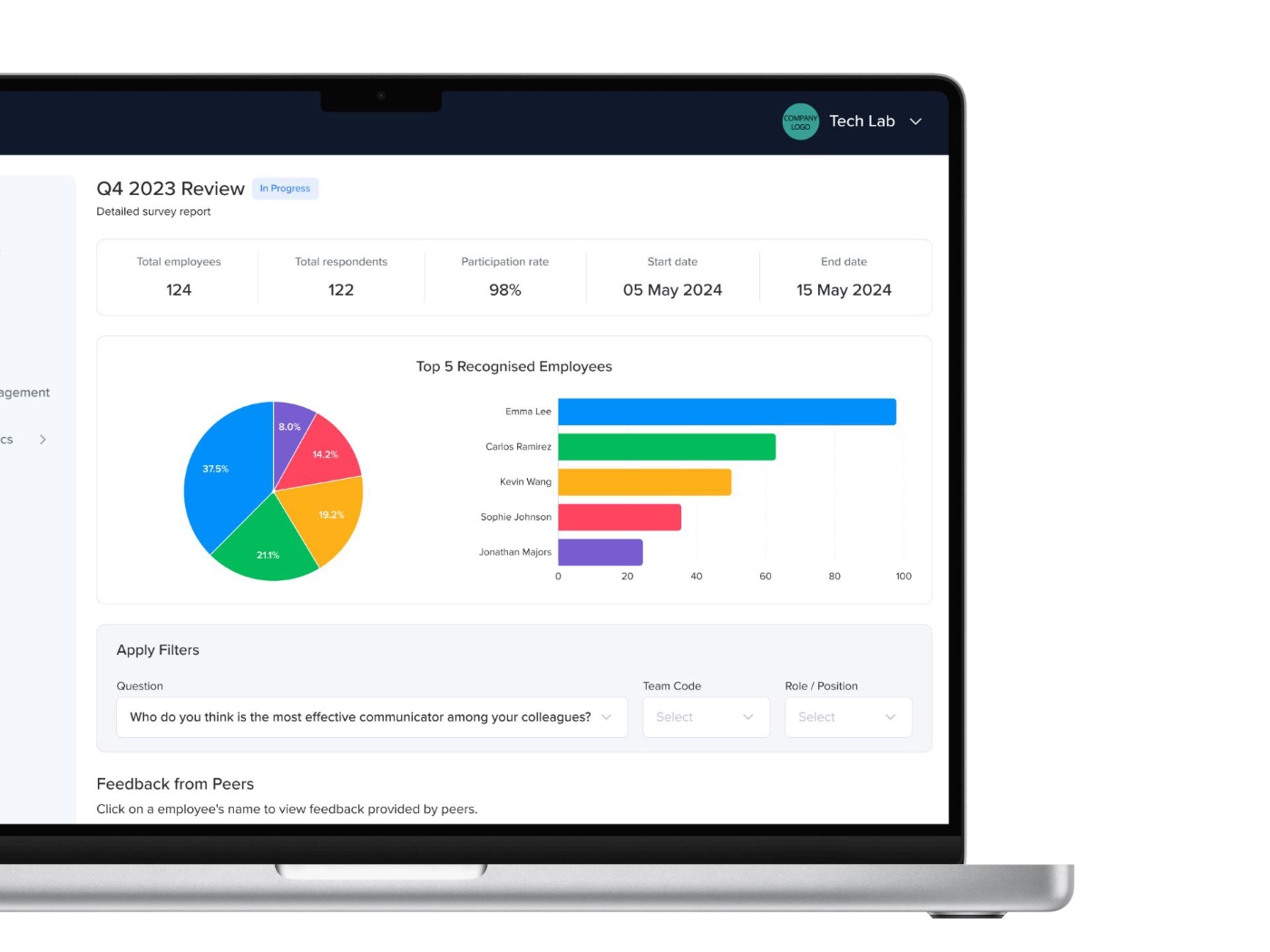
Company Admin Interface
The platform management layer for HR leads and senior administration:
- Initiate PPR reviews via manual entry or CSV upload of manager and employee data
- Manage teams, workgroups and user roles across the organisation
- View company-wide analytical dashboards with bar and pie chart visualisations
- Filter results by department, workgroup, team, individual question & individual employee
- Questionnaire management: add, edit & update survey questions
- Assign additional admin, HR director and super-admin roles
- Request GDPR data wipe and platform unsubscribe
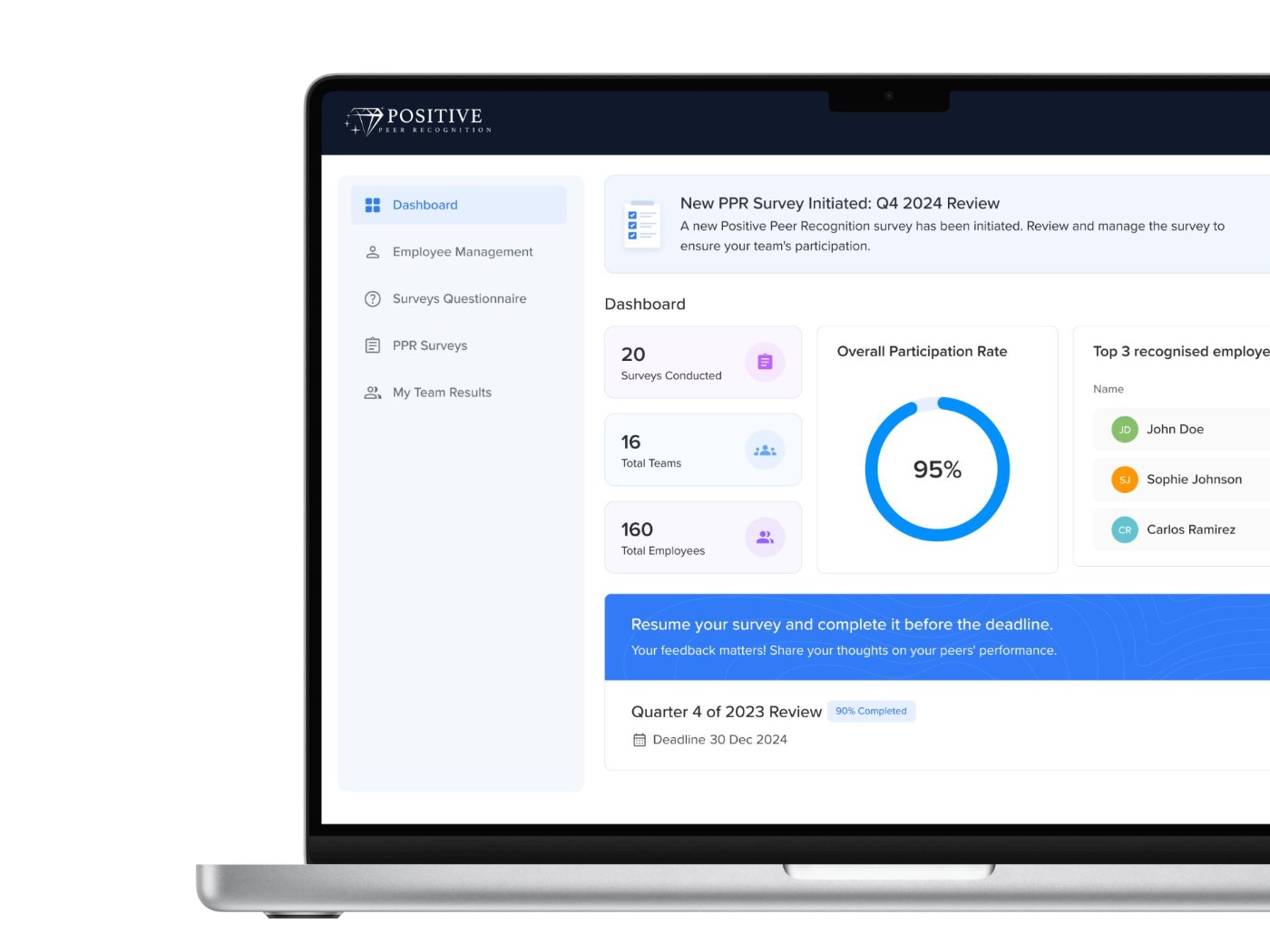
Team Manager Interface
The team-level view for managers and team leads:
- Review and confirm direct report rosters, with the ability to add, edit or remove employees before the survey is sent
- Submit team roster to trigger employee survey invitations
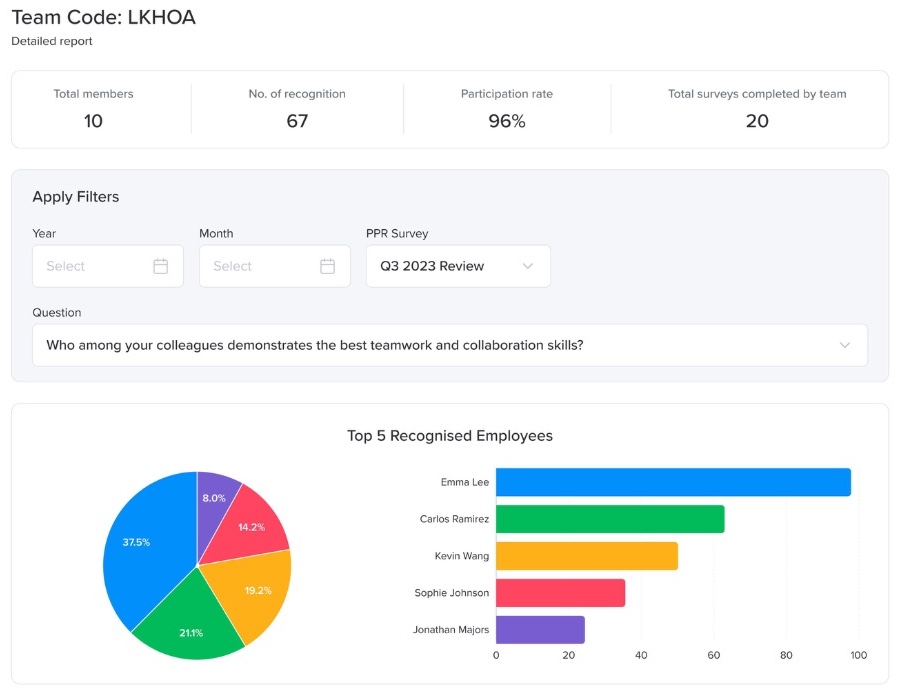
- View team-level PPR results in analytical dashboards, including MCQ pie charts and written responses per question
- Filter results by date, survey cycle and individual employee
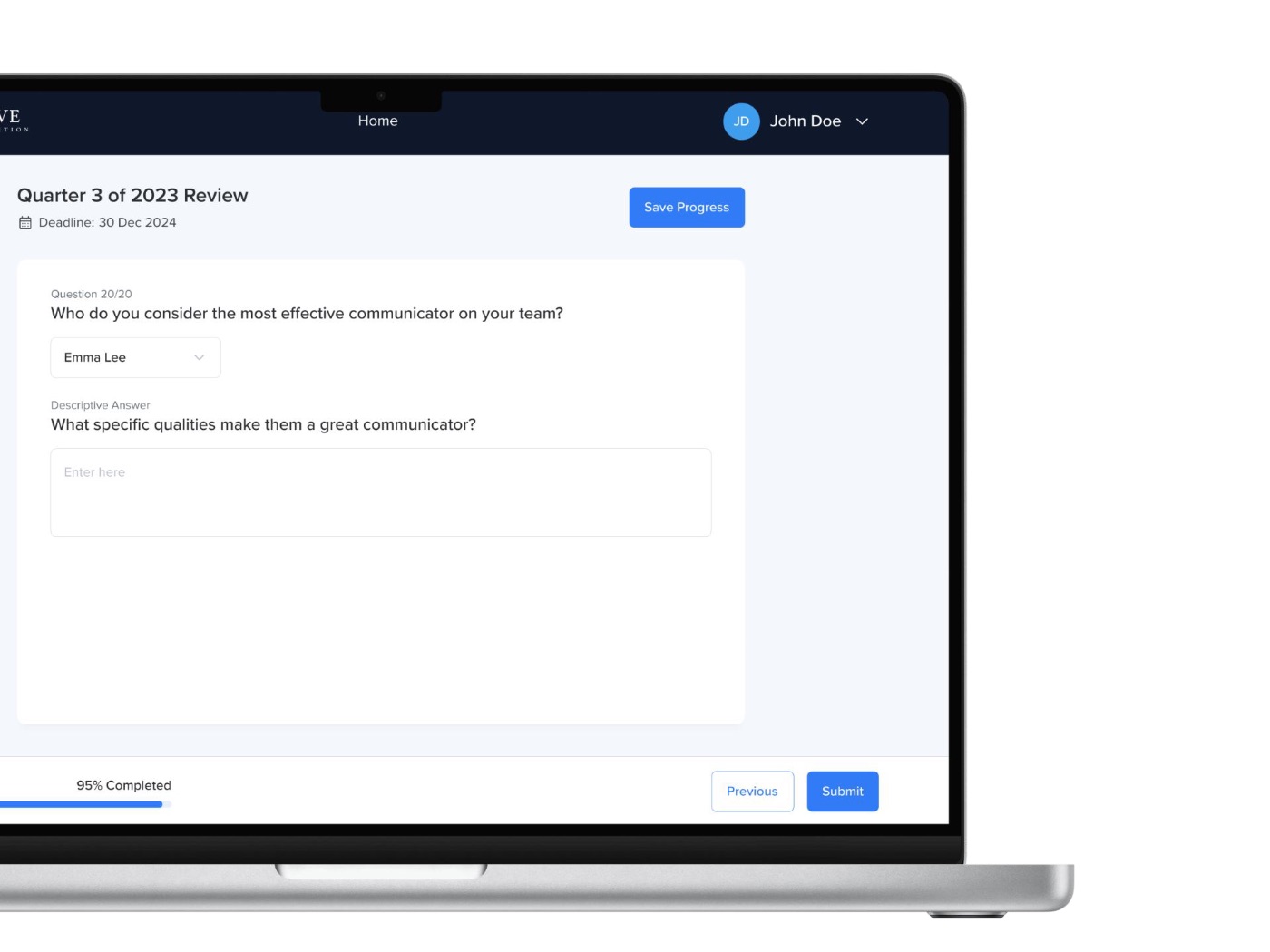
Employee Survey Interface
The survey completion portal for all employees:
- One-question-at-a-time survey flow with MCQ peer selection and written explanation questions
- Shuffled peer name dropdown on every question, with own name excluded from all selections
- Save progress and resume anytime, with an automated next-day reminder if incomplete.
- Profile view showing employee details, team information and survey completion history
Key Features and Capabilities
Positive Peer Recognition Survey
The survey presents up to 20 questions, each pairing a peer selection from a shuffled dropdown with a written explanation. Questions focus exclusively on positive attributes: effective communication, helpfulness, adaptability and leadership qualities. The positive-only frame creates a constructive experience for participants and avoids the defensiveness associated with traditional 360-degree reviews.
Bias Reduction Mechanisms
The peer name list is reshuffled on every question, requiring employees to actively locate the name of the colleague they wish to endorse rather than defaulting to whoever appears at the top of a static list. Each employee's own name is excluded from their own survey, and all selections are anonymous within the peer group, supporting deliberate and considered recognition.
Flexible Team Onboarding
Company admins can onboard teams manually for small deployments or via CSV for large-scale rollouts, with managers receiving an email to confirm, edit or supplement their direct report roster before the survey is triggered. The system supports multiple team names across the same review cycle and handles duplicate names through manager-editable display names.
Analytical Dashboards
Results are presented in two chart types: bar charts showing overall recommendation frequency across the team or organisation, and pie charts showing the percentage of nominations each employee received for a specific question. Company admins see results across all teams; managers see their own team. Both can filter by date, team, individual question and individual employee.
Survey Completion Management
Employee progress is saved automatically throughout the survey, allowing participants to pause and return without losing their answers. Employees who have not completed the survey receive an automated reminder email the next day. Managers receive notifications when employees complete their submission, and can track completion status across their team.
Role-Based Access and Notifications
Access is separated across three roles: company admin, team manager and employee. Each role sees only the data relevant to their function. Automated email notifications handle every stage of the PPR cycle, from initial registration and survey dispatch through to submission confirmation & result availability, removing the need for manual coordination at any point.
How It Works
Admin Initiates the Review
The company admin logs in and starts a new PPR review cycle. They add team managers manually or upload the full company roster via CSV, triggering an email to each manager with instructions to log in and confirm their team.
Managers Confirm Their Teams
Each manager logs in, reviews their direct report roster and makes any necessary additions, edits or removals. Once satisfied, they submit the team, which triggers the employee survey invitations automatically.
Employees Complete the Survey
Each employee receives an email to access the survey. They work through the questions one at a time, selecting a peer from a shuffled dropdown and providing a written response. Progress is saved automatically, and an automated reminder is sent the following day for incomplete submissions.
Results Are Aggregated
As submissions come in, the platform aggregates peer nominations and written responses per question. Managers are notified as their team members complete the survey, and can track submission status across the team in their dashboard.
Insights Are Reviewed
Company admins and managers log in to view their dashboards. Bar charts show overall recommendation frequency across the organisation or team; pie charts break down peer selections per question. Results can be filtered by date, team, question and individual employee to support talent decisions and succession planning.
Here's What Our Client Has to Say
“The platform the Optimize Tech Studio team built captures everything that makes our Positive Peer Recognition methodology work. The survey flow feels natural for employees, the bias-reduction mechanisms are built into the experience without drawing attention to themselves, and the dashboards give our clients exactly what they need to make talent decisions with confidence. It has allowed us to scale our process to organisations of any size.”

Outcomes & Impact
Peer-Validated Talent Identification
The platform surfaces high-performing employees, including those who do not self-promote, through the collective endorsement of their peers. Organisations gain a view of their talent pool that management observation and self-reported reviews consistently miss.
Reduced Structural Bias
By removing self-reporting and relying solely on peer nominations with bias-reduction mechanisms built into the survey flow, the platform mitigates the structural inequities that affect traditional performance reviews, supporting more meritocratic recognition and promotion decisions.
Actionable Team Insights
Managers and admins can identify top performers, spot collaboration patterns and inform succession planning directly from the dashboard. The combination of quantitative peer selection data and qualitative written responses gives a fuller picture of each employee's contribution to the team.
Technologies Used to Develop the Solution

PHP Laravel
Full-stack web framework powering the three-interface application across company admin, team manager and employee roles, with a one-question-at-a-time survey flow and real-time analytical dashboards.

MySQL
Company, team, user, survey, response and nomination data with relational structure supporting multi-team, multi-cycle review history and filterable reporting.

Blade
Laravel's Blade templating engine powering the server-rendered survey interface, admin dashboards and manager views across all three user roles.

Email / Password and SSO
Secure account access with email and password login, SSO support for employees, and email-based registration for managers and admins.

CSV Upload
Bulk import of manager and employee data via CSV in a predefined format, supporting company-wide rollouts without manual data entry at scale.

Automated Email
System-generated emails at every stage of the PPR cycle: registration, survey dispatch, progress reminders, submission confirmation and result availability.

Chart Visualisations
Bar charts for overall recommendation frequency and pie charts for per-question percentage distributions, with filtering by date, team, question and individual employee.

GDPR Data Management
Admin-initiated data wipe and platform unsubscribe functionality, removing all positive peer recognition data from the database on request.
Prefer to talk it through first?
Book 30-Min Tech Session →